Betaflight + Gazebo Software-In-The-Loop Simulation Tutorial
Complete guide to Betaflight SITL + Gazebo Harmonic on Ubuntu 22.04, including plugin compilation, CLI arming config, and Python closed-loop control
About ROS2: This tutorial’s simulation link (Gazebo ↔ SITL ↔ Controller) uses direct UDP communication without ROS2. ROS2’s ros_gz_bridge can be added for multi-drone, distributed communication, or ROS2 ecosystem integration.
This tutorial is fairly complex and focuses on explaining the overall framework. Full source files are available at the GitHub repository ↗ — contributions and stars appreciated!
Introduction#
Betaflight is the most popular open-source flight controller firmware in FPV Racing and Freestyle drone communities, widely deployed on STM32/AT32 MCUs. Betaflight provides SITL (Software-In-The-Loop) mode, enabling developers to run the complete Betaflight firmware within the Gazebo physics simulation engine.

The core idea behind SITL: compile the Betaflight firmware as an x86_64 Linux executable. The flight controller’s sensor inputs (IMU, barometer, GPS) come from the Gazebo simulation environment via UDP packets containing simulated sensor data. The flight controller’s motor outputs (PWM commands) are likewise sent back to Gazebo via UDP to drive the propellers in the physics engine. This enables developers to fully validate flight controller logic and control algorithms on a PC, with no real hardware required.
This article provides a complete walkthrough for setting up a Betaflight SITL + Gazebo Harmonic + Python autonomous control simulation environment on Ubuntu 22.04. Before we begin, credit goes to the OSRF vehicle_gateway project and the Betaflight community for their open-source code and documentation — this tutorial draws heavily on those resources.
Prerequisites#
Following the author’s earlier ROS2+PX4 simulation tutorials, the following foundational environment should already be configured:
- Ubuntu 22.04
- ROS2 Humble (recommended: FishROS one-line installer —
wget http://fishros.com/install -O fishros && . fishros) - Gazebo Harmonic (gz-sim8, version 8.9.0)
- ROS2-Gazebo communication bridge
ros-humble-ros-gzharmonic
Verify in a terminal:
ros2 --version       # Output should contain "humble"
gz sim --versions    # Output should be "Gazebo Sim 8.9.0"
dpkg -l | grep ros-humble-ros-gzharmonic # Should show installedInstall required tools and Gazebo dev packages (needed for compiling plugins — the gz-harmonic runtime does NOT include these headers):
pip3 install --user websockify
sudo apt-get install -y socat

# Gazebo Harmonic dev packages — required for compiling custom Gazebo plugins!
sudo apt-get install -y \
    libgz-sim8-dev \
    libgz-transport13-dev \
    libgz-msgs10-dev \
    libgz-math7-dev \
    libgz-plugin2-dev \
libsdformat14-devwebsockify: provides WebSocket → TCP proxying, used to connect to the Betaflight Configurator ground-station tool in a browsersocat: creates virtual serial ports (pty), mapping Betaflight’s TCP UART to a local virtual serial device
Ensure your network can reliably access GitHub, otherwise large repository clones may fail partway through.
Simulation Link Architecture#
Before diving into configuration, let us examine the full simulation link — this helps with diagnosing issues later. The simulation link consists of four processes that communicate via UDP ports:
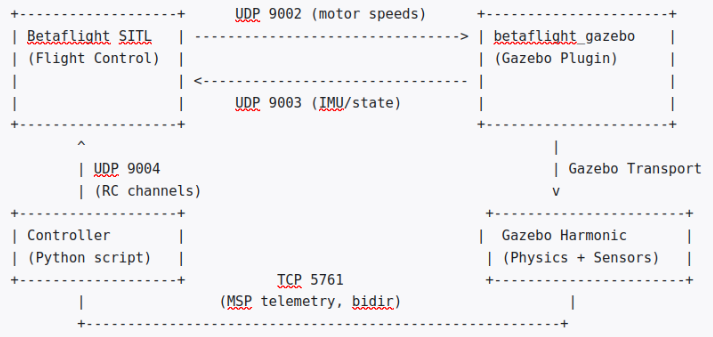
Port allocation and data flow (Betaflight source sitl.c lines 192–195):
| Port | Direction | Purpose | Packet Type |
|---|---|---|---|
| 9001 | SITL → External | Raw PWM (reserved for RealFlightBridge) | servo_packet_raw |
| 9002 | SITL → Gazebo | Motor speed commands [0.0, 1.0] (3D mode: [-1.0, 1.0]) | servo_packet |
| 9003 | Gazebo → SITL | Flight state data (IMU, position, velocity, attitude, pressure) | fdm_packet |
| 9004 | Controller → SITL | 16-channel RC control signals [1000–2000] | rc_packet |
| TCP 5761 | Bidirectional | MSP protocol (configuration + telemetry feedback) | N/A |
Packet structures (Betaflight source target.h lines 224–246):
// fdm_packet: Gazebo plugin → SITL
typedef struct {
    double timestamp;
    double imu_angular_velocity_rpy[3];    // Angular velocity (rad/s)
    double imu_linear_acceleration_xyz[3]; // Linear acceleration (m/s²)
    double imu_orientation_quat[4];        // Attitude quaternion (w,x,y,z)
    double velocity_xyz[3];                // Velocity (m/s, ENU frame)
    double position_xyz[3];                // Position
    double pressure;                       // Pressure (Pa)
} fdm_packet;

// servo_packet: SITL → Gazebo plugin
typedef struct {
    float motor_speed[4];   // [0.0, 1.0] or 3D mode [-1.0, 1.0]
} servo_packet;

// rc_packet: Controller → SITL
typedef struct {
    double timestamp;
    uint16_t channels[16];   // PWM [1000, 2000]
} rc_packet;The Gazebo plugin (BetaflightPlugin) runs two phases per simulation update cycle:
- PreUpdate (before simulation step): Calls
ReceiveServoPacket()to readservo_packetfrom UDP 9002, converts motor speeds into joint force/velocity commands - PostUpdate (after simulation step): Reads angular velocity and acceleration from the IMU sensor, obtains pose and linear velocity from the Gazebo Entity Component Manager, populates an
fdm_packet, applies coordinate frame transformations, and sends it via UDP to 127.0.0.1:9003
Compiling Betaflight SITL#
cd ~
git clone https://github.com/betaflight/betaflight.git
cd betaflightNote: We use the master branch (version 2026.6.0-alpha), not the 4.5.x release, because the 4.5.x stable release’s SITL code lacks native Gazebo support — the
ENABLE_GAZEBO_BRIDGEfeature was only introduced into master after 4.5.4.
Unlike compiling PX4 which requires an ARM cross-compilation toolchain, the SITL mode compiles directly with the host GCC:
make TARGET=SITL -j$(nproc)Successful build output:
Linking SITL
   text    data     bss     dec     hex  filename
389784 21804 77376 488964 77604 ./obj/main/betaflight_SITL.elfVerify:
./obj/main/betaflight_SITL.elf --help
# Output: Betaflight SITL Usage: ./obj/main/betaflight_SITL.elf [options]Why can SITL run standalone? Because Betaflight SITL emulates the real flight controller’s hardware peripherals in software: virtual IMU (accgyro_virtual.c) receives angular velocity and acceleration data from Gazebo; virtual barometer (barometer_virtual.c) receives pressure/altitude data; virtual GPS (gps_virtual.c) receives position data; virtual EEPROM (file I/O) stores configuration as eeprom.bin; virtual UART (serial_tcp.c) replaces physical UART with TCP.
After compilation, it is advisable to back up: zip -r betaflight.zip betaflight/
Obtaining and Compiling the Gazebo Plugin#
Betaflight itself does not include a Gazebo plugin. We need the betaflight_gazebo plugin from OSRF’s vehicle_gateway project. Important: vehicle_gateway officially targets Gazebo Garden (gz-sim7), while our environment uses Gazebo Harmonic (gz-sim8), requiring compatibility modifications.
Step 1: Clone and exclude unneeded sub-packages#
cd ~/ros2_ws/src
git clone https://github.com/osrf/vehicle_gateway.git vehicle_gateway

cd ~/ros2_ws/src/vehicle_gateway
for pkg in gz_aerial_plugins vehicle_gateway vehicle_gateway_betaflight \
    vehicle_gateway_demo vehicle_gateway_integration_test vehicle_gateway_multi \
    vehicle_gateway_px4 vehicle_gateway_python vehicle_gateway_python_helpers \
    vehicle_gateway_sim_performance px4_sim betaflight_configurator \
    betaflight_demo qgroundcontrol; do
    touch "$pkg/COLCON_IGNORE"
doneStep 2: Adapting for Gazebo Harmonic (2 files need version number updates; the other 3 code fixes are already upstream)#
The current upstream OSRF vehicle_gateway code already includes most of the Gazebo Harmonic compatibility fixes. Only the library version numbers in two files still need manual changes.
Required changes — Update library version numbers in both CMakeLists.txt and package.xml
(1) Edit ~/ros2_ws/src/vehicle_gateway/betaflight_gazebo/CMakeLists.txt
Replace all occurrences (including find_package, target_link_libraries, and any other references). Search globally for:
- All
gz-sim7→gz-sim8 - All
gz-transport12→gz-transport13
(2) Edit ~/ros2_ws/src/vehicle_gateway/betaflight_gazebo/package.xml
Update the <depend> declarations:
<depend>gz-sim7</depend>→<depend>gz-sim8</depend><depend>gz-transport12</depend>→<depend>gz-transport13</depend>
Why? Gazebo Garden (gz-sim7, gz-transport12) and Gazebo Harmonic (gz-sim8, gz-transport13) have incompatible ABIs. The plugin must link against the same library versions as the Gazebo server process. gz-math7 and gz-plugin2 are shared across both versions. The
package.xmlmust also be updated, otherwisecolcon/rosdepwill try to resolvegz-sim7as a dependency and fail in a Harmonic-only environment.
Verification items — The following three are already fixed upstream. No manual changes needed, but verify your clone includes them:
Check 1: Header includes (BetaflightPlugin.cpp lines 35–39)
~/ros2_ws/src/vehicle_gateway/betaflight_gazebo/src/BetaflightPlugin.cpp should already contain:
#include <functional>
#include <gz/msgs/imu.pb.h>
#include <gz/msgs/fluid_pressure.pb.h>
#include <gz/msgs/double.pb.h>Context: Gazebo Harmonic (gz-sim8)‘s
System.hhno longer transitively includes protobuf message headers, so explicit includes are needed. If your clone is missing these, add them manually.
Check 2: IMU and fluid pressure subscriptions (PreUpdate lines 440–443; Configure lines 296–301)
The IMU subscription is in PreUpdate (around line 440), and the pressure sensor subscription is in Configure (around line 296). Both already use the std::function + std::bind pattern — no changes needed:
IMU subscription in PreUpdate (around line 440):
std::function<void(const gz::msgs::IMU&)> imuCb =
    std::bind(&BetaFlightPluginPrivate::ImuCb,
              this->dataPtr.get(), std::placeholders::_1);
this->dataPtr->node.Subscribe(imuTopicName, imuCb);Fluid pressure subscription in Configure (around line 296):
std::function<void(const gz::msgs::FluidPressure&)> airPressureCb =
    std::bind(&BetaFlightPluginPrivate::onAirPressureMessageReceived,
              this->dataPtr.get(), std::placeholders::_1);
this->dataPtr->node.Subscribe(
    "/world/empty_betaflight_world/model/iris_with_Betaflight/model/iris_with_standoffs/"
    "link/imu_link/sensor/air_pressure_sensor/air_pressure",
airPressureCb);Context: Gazebo Garden’s gz-transport12 allowed
Node::Subscribeto accept member function pointers directly for template deduction. gz-transport13 tightened the rules, requiring an explicitstd::functionwrapper. The IMU callbackImuCbhas signaturevoid(const gz::msgs::IMU&), and the pressure callbackonAirPressureMessageReceivedhas signaturevoid(const gz::msgs::FluidPressure&).
Check 3: Deadlock fix in PostUpdate (lines 478–484)
The PostUpdate function should NOT contain the betaflightOnline condition:
if (!_info.paused && _info.simTime > this->dataPtr->lastControllerUpdateTime)
{
    double t = ...;
    this->SendState(t, _ecm);
    ...
}If you see && this->dataPtr->betaflightOnline, delete it. Why: Initially SITL waits for Gazebo to send an fdm_packet, while Gazebo skips sending fdm_packet because betaflightOnline == false — a deadlock that never resolves.
Step 3: Build the plugin#
cd ~/ros2_ws
source /opt/ros/humble/setup.bash
colcon build --packages-select betaflight_gazeboVerify: ls -lh ~/ros2_ws/install/betaflight_gazebo/lib/libBetaflightPlugin.so (approximately 8.7M)
Simulation World Configuration#
Create the launch package directory structure:
mkdir -p ~/bf_sitl/{launch,worlds,models,config}
ln -sf ~/ros2_ws/src/vehicle_gateway/betaflight_sim/models/iris_with_standoffs \
~/bf_sitl/models/iris_with_standoffsCore plugin configuration in the world file betaflight_world.sdf:
<plugin name="BetaFlightPlugin" filename="BetaflightPlugin">
    <fdm_addr>127.0.0.1</fdm_addr>
    <fdm_port_in>9002</fdm_port_in>
    <listen_addr>127.0.0.1</listen_addr>
    <modelXYZToAirplaneXForwardZDown>0 0 0 3.141593 0 0</modelXYZToAirplaneXForwardZDown>
    <gazeboXYZToNED>0 0 0 3.141593 0 0</gazeboXYZToNED>
    <imuName>iris_with_standoffs::imu_link::imu_sensor</imuName>
    <control channel="0">
        <jointName>iris_with_standoffs::rotor_0_joint</jointName>
        <multiplier>838</multiplier>
    </control>
    <!-- channels 1-3 similarly configured, multipliers: 838, -838, -838 -->
</plugin>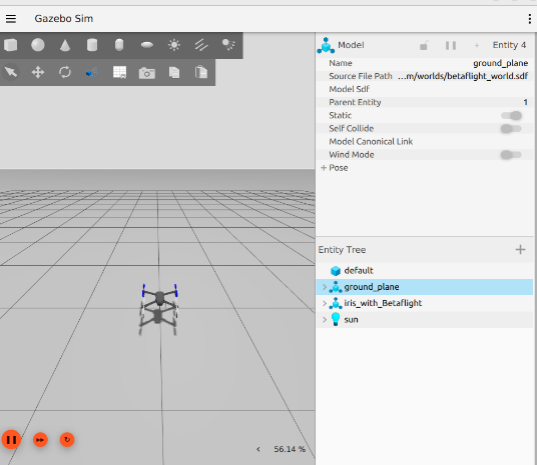
Coordinate frame transform explained: Gazebo uses ENU (X=East, Y=North, Z=Up); Betaflight expects NED (X=North, Y=East, Z=Down).
gazeboXYZToNEDwith Yaw=180° performs the heading rotation, and the plugin’s internalSendState()further applies anRz(π/2)rotation to complete the full transform.
Configuring ARM — Enabling the Flight Controller to Arm#
Betaflight defaults to disarmed (ARM disabled). We need to configure AUX1 to enter ARM mode when its channel value is in the 1700–2100 range. First, start SITL:
cd ~/bf_sitl/config
~/betaflight/obj/main/betaflight_SITL.elf --ip 127.0.0.1Wait for bind port 5761 for UART1, then run the CLI configuration script bf_cli_config.py:
#!/usr/bin/env python3
"""Configure Betaflight SITL via TCP CLI — set ARM on AUX1, save to eeprom"""
import socket, time, sys

HOST, PORT = '127.0.0.1', 5761

print("Waiting for SITL TCP port 5761...")
for i in range(30):
    try:
        s = socket.socket(); s.settimeout(1)
        s.connect((HOST, PORT)); s.close()
        print(f"Connected after {i+1}s"); break
    except:
        time.sleep(1)
else:
    print("ERROR: SITL not ready after 30s"); sys.exit(1)

sock = socket.socket(socket.AF_INET, socket.SOCK_STREAM)
sock.settimeout(10)
sock.connect((HOST, PORT))
time.sleep(2)

# Drain initial output
try: sock.recv(8192)
except: pass

# Enter CLI mode (send '#' instead of MSP header '$')
print("Entering CLI mode...")
sock.send(b'#\n')
time.sleep(2)
try:
    data = sock.recv(4096)
    print(data.decode('utf-8', errors='replace')[:300])
except: pass

# Set ARM on AUX1 (mode=0=ARM, aux=0=AUX1, range=1700-2100)
print("\nSetting ARM on AUX1 (1700-2100)...")
sock.send(b'aux 0 0 0 1700 2100\n')
time.sleep(1)

# Save to EEPROM and reboot
print("Saving to EEPROM...")
sock.send(b'save\n')
time.sleep(5)
try:
    data = sock.recv(8192)
    print(data.decode('utf-8', errors='replace')[-300:])
except Exception as e:
    print(f"Save response: {e}")

sock.close()
print("\nDone! eeprom.bin configured with ARM on AUX1.")What aux 0 0 0 1700 2100 means: 1st 0 = configuration slot; 2nd 0 = mode ID (0 = ARM); 3rd 0 = AUX channel index (0 = AUX1); 1700 2100 = trigger range.
AUX Channel Mode Reference#
aux <slot> <mode ID> <AUX channel> <range low> <range high>
Common mode IDs:
| ID | Name | Function |
|---|---|---|
| 0 | ARM | Arm/disarm the flight controller |
| 1 | ANGLE | Self-stabilizing mode |
| 2 | HORIZON | Semi-stabilizing mode |
| 5 | HEADFREE | Head-free mode |
| 11 | GPS RESCUE | GPS rescue return-to-home |
| 22 | AIRMODE | Air mode |
| 26 | CRASH FLIP | Turtle mode (flip after crash) |
| 27 | PREARM | Pre-arm |
Example — adding ANGLE mode on AUX2 (1500–2100):
aux 1 1 1 1500 2100Launching the Simulation — Three-Terminal Workflow#
Terminal 1 — Betaflight SITL:
cd ~/bf_sitl/config
~/betaflight/obj/main/betaflight_SITL.elf --ip 127.0.0.1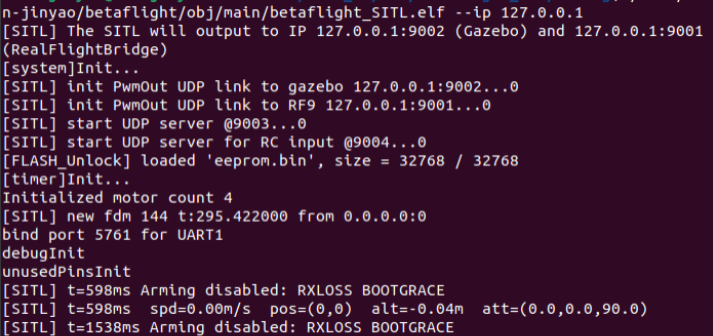
Terminal 2 — Gazebo Harmonic:
export GZ_SIM_SYSTEM_PLUGIN_PATH=$HOME/ros2_ws/install/betaflight_gazebo/lib
export GZ_SIM_RESOURCE_PATH=$HOME/ros2_ws/src/betaflight_sim/models
gz sim -r -v 4 ~/bf_sitl/worlds/betaflight_world.sdf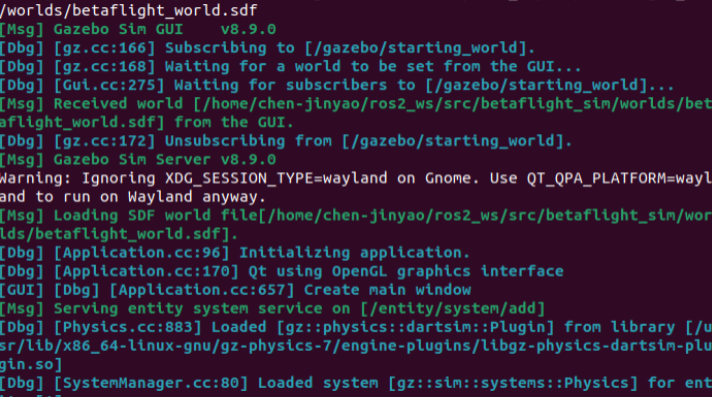
Terminal 3 — Closed-loop altitude controller:
python3 ~/bf_sitl/autonomy/msp_closed_loop_controller.py \
--target-alt 2.0 --hover-base 1450 --kp 3 --ki 1 --kd 2Video 1: Takeoff demo — closed-loop altitude hold control
RC packet send frequency: The controller must send RC packets at a minimum of 50Hz. Betaflight’s receiver timeout window is approximately 100ms — exceeding this triggers RXLOSS. This controller runs on a dedicated thread at 100Hz. Altitude sign convention: Betaflight’s
getEstimatedAltitudeCm()returns NED altitude (positive = downwards). The controller internally negates the value so that “up is positive”.
Controller Code Walkthrough#
The closed-loop controller msp_closed_loop_controller.py. Place this file under ~/bf_sitl/autonomy/.
File: msp_closed_loop_controller.py (closed-loop altitude hold controller)
#!/usr/bin/env python3
"""
Closed-loop altitude hold controller for Betaflight SITL.
- Reads drone state via MSP over TCP 5761 (altitude, attitude, IMU, battery)
- Sends RC via UDP 9004 (100Hz)
- PID altitude control with attitude monitoring

This is the SAME architecture used on real hardware (TCP -> UART serial).
"""
import socket, struct, time, signal, sys, argparse, threading
from msp_reader import MSPReader

BF_IP, BF_PORT = '127.0.0.1', 9004
NUM_CH = 16

class ClosedLoopController:
    def __init__(self, target_alt=2.0, hover_base=1450, kp=80, ki=5, kd=40):
        self.sock = socket.socket(socket.AF_INET, socket.SOCK_DGRAM)
        self.msp = MSPReader()
        self.target_alt = target_alt
        self.hover_base = hover_base
        self.kp, self.ki, self.kd = kp, ki, kd
        self.integral = 0.0
        self.last_error = 0.0
        self.lock = threading.Lock()
        self.throttle = 1000
        self.aux1 = 1000
        self.running = True
        signal.signal(signal.SIGINT, self.stop)
        signal.signal(signal.SIGTERM, self.stop)

    def stop(self, *args):
        print("\nDisarming...")
        self.running = False
        with self.lock:
            self.throttle = 1000
            self.aux1 = 1000
        time.sleep(0.3)
        self.msp.stop()
        self.sock.close()
        sys.exit(0)

    def send_rc(self, channels):
        ts = time.time()
        pkt = struct.pack('<d' + 'H' * NUM_CH, ts, *channels)
        try:
            self.sock.sendto(pkt, (BF_IP, BF_PORT))
        except:
            pass

    def rc_thread(self):
        """Send RC at 100Hz independently of state reading"""
        while self.running:
            with self.lock:
                t, a = self.throttle, self.aux1
            ch = [1500] * NUM_CH
            ch[2], ch[4] = t, a
            self.send_rc(ch)
            time.sleep(0.01)

    def run(self):
        print("=" * 60)
        print("Betaflight SITL Closed-Loop Controller (MSP + UDP)")
        print(f"Target altitude: {self.target_alt}m")
        print(f"Hover base: {self.hover_base}  PID: kp={self.kp} ki={self.ki} kd={self.kd}")
        print("=" * 60)

        if not self.msp.start():
            print("ERROR: Failed to connect MSP reader. Is SITL running?")
            sys.exit(1)

        threading.Thread(target=self.rc_thread, daemon=True).start()

        # Phase 1: Disarmed init (3s)
        print("\nPhase 1: Init (disarmed, 3s)...")
        with self.lock:
            self.throttle = 1000
            self.aux1 = 1000
        time.sleep(3)

        # Phase 2: Arm (2s) -- throttle MUST be 1000 for arming
        print("Phase 2: Arming (2s)...")
        with self.lock:
            self.throttle = 1000
            self.aux1 = 2000
        time.sleep(2)

        # Phase 3: Altitude hold with PID
        print(f"Phase 3: Altitude hold at {self.target_alt}m...")
        last_time = time.time()

        while self.running:
            state = self.msp.get_state()
            now = time.time()
            dt = now - last_time
            if dt <= 0 or dt > 1.0:
                dt = 0.05

            # Get altitude from MSP (cm -> m).
            # Betaflight reports NED (positive=down), negate so "up" is positive.
            alt = -state.get('alt_cm', 0) / 100.0 if state else 0.0

            # PID control
            error = self.target_alt - alt
            self.integral += error * dt
            self.integral = max(-200, min(200, self.integral))
            deriv = (error - self.last_error) / dt
            pid = self.kp * error + self.ki * self.integral + self.kd * deriv
            thr = int(self.hover_base + pid)
            thr = max(1000, min(1900, thr))

            with self.lock:
                self.throttle = thr
                self.aux1 = 2000

            # Display
            roll = state.get('roll_deg', 0)
            pitch = state.get('pitch_deg', 0)
            volt = state.get('voltage_v', 0)
            rssi = state.get('rssi', 0)
            mode = state.get('flight_mode', 0)
            armed = bool(mode & (1 << 0)) if 'flight_mode' in state else False

            print(f"\r  alt={alt:.2f}m err={error:+.2f} thr={thr} "
                  f"r={roll:.0f}° p={pitch:.0f}° "
                  f"v={volt:.1f}V RSSI={rssi} armed={armed}  ",
                  end='', flush=True)

            self.last_error = error
            last_time = now
            time.sleep(0.05)

def main():
    p = argparse.ArgumentParser()
    p.add_argument('--target-alt', type=float, default=2.0)
    p.add_argument('--hover-base', type=int, default=1450)
    p.add_argument('--kp', type=float, default=80)
    p.add_argument('--ki', type=float, default=5)
    p.add_argument('--kd', type=float, default=40)
    args = p.parse_args()
    ClosedLoopController(args.target_alt, args.hover_base,
                         args.kp, args.ki, args.kd).run()

if __name__ == '__main__':
main()Core logic of the closed-loop controller msp_closed_loop_controller.py:
- RC send thread (100Hz): Reads throttle and AUX values from shared variables, assembles a 16-channel array using AETR channel mapping, packs with
struct.pack, and sends via UDP 9004 - MSP telemetry thread (~20Hz): Loops sending MSPv1 request frames, parses responses to obtain altitude, attitude, voltage, etc.
- Main PID loop (20Hz): Reads altitude, compares with target to get error, runs through PID computation, superimposes result onto the hover throttle baseline
MSPv1 request frame format (6 bytes): $ M < size(0) cmd CRC(cmd). Response frame: $ M > size cmd payload(N bytes) CRC.
Real-hardware correspondence: UDP 9004 → UART serial (MSP_SET_RAW_RC), TCP 5761 → UART serial (MSP telemetry). msp_reader.py and PID logic are fully reusable — simply replace the socket with a serial port.
Troubleshooting Quick Reference#
| Symptom | Most Likely Cause | Diagnosis |
|---|---|---|
| No “new fdm” messages in SITL after Gazebo starts | Plugin not loaded or UDP unreachable | Run gz sim -v 4 and check for “Loaded system [BetaFlightPlugin]“ |
| SITL persistently shows RXLOSS | RC controller not running | Look for new rc in SITL terminal — indicates first RC packet received |
| SITL shows “Arming disabled: THROTTLE” | Throttle channel value too high during arm attempt | Verify Phase 2 ch[2] is at 1000 |
| SITL shows FAILSAFE RXLOSS | RC send interval exceeds 100ms | Ensure sending at ≥50Hz. Blocking operations (e.g., file I/O) must run in separate threads |
| Props spinning but no takeoff | Hover throttle too low | Gradually increase --hover-base; IRIS needs approximately 1450–1600 |
| Controller reads alt=0.00 and never changes | MSP response parsing failed or altitude sign error | Run msp_reader.py standalone to verify MSP communication |
| Controller alt values correct but drone flies erratically | PID parameters too aggressive | Start with conservative values: --kp 2 --ki 1 --kd 1 |
| Betaflight SITL compilation fails | Missing build dependencies | sudo apt install build-essential |
Plugin compilation fails with Could not find gz-sim8 | Gazebo dev packages not installed | sudo apt install -y libgz-sim8-dev libgz-transport13-dev libgz-msgs10-dev libgz-math7-dev libgz-plugin2-dev libsdformat14-dev |
Plugin compilation fails with colcon Cannot find package gz-sim7 | package.xml version numbers not updated | Change gz-sim7→gz-sim8 and gz-transport12→gz-transport13 in package.xml |
Plugin compilation fails with gz/msgs/imu.pb.h not found | gz-msgs10-dev not installed | sudo apt install libgz-msgs10-dev |
| Plugin compilation fails with “no matching function for Subscribe” | std::function + std::bind not applied correctly | Cross-check against Check 2 code examples |
gz sim --versions shows multiple versions | Multiple Gazebo versions installed | Keep only gz-harmonic |
Summary#
This article provided a complete walkthrough for the Betaflight SITL + Gazebo Harmonic simulation environment, covering SITL compilation, four critical Gazebo plugin compatibility adaptations, CLI arming configuration, AUX channel mode setup, and a Python closed-loop altitude controller implementation. Betaflight’s SITL mode delivers hardware-free, closed-loop simulation capability for flight controller algorithm validation — when paired with the Gazebo physics engine, it can verify the complete control pipeline from sensor input to motor output. To add visual perception to your simulation, check out YOLOv8 Object Detection in PX4 Drone Simulation.
Contributions and feedback welcome at the GitHub repository ↗!
References#
- Betaflight SITL Documentation ↗
- OSRF vehicle_gateway Repository ↗
- Betaflight source code — SITL platform implementation — sitl.c, target.h, udplink.c
- Gazebo Harmonic Installation Docs ↗
- ROS2 + Gazebo bridge package — ros-humble-ros-gzharmonic API documentation
- Betaflight Configurator ↗